A motor superyacht at anchor at dusk, seen from above

AI agent · set up for one vessel · runs on board

The AI agent that knows your vessel and does the work.

An advanced AI solution for superyacht operations. It turns everything your vessel already holds, manuals, drawings, correspondence, quotations, PMS records, into finished work: the answer with the page, the reply to the contractor, the requisition, the fault checklist. Less time at the desk. More for the vessel.

Runs fully offline on boardNothing is sent without your approvalEvery answer cites document and page

Built and running on a working superyacht. Figures from that installation, the archive the agent works from.

1,532manuals and drawings
295systems and equipment items
179maintenance tasks from the manuals

What it does

Five kinds of work. One agent, for the whole vessel team.

Ask in plain language. The agent finds the right documents, does the work and shows where every answer comes from.

Email

Reads the whole thread with a contractor, not just the last message. Summarises what was inspected, quoted and left open, drafts the reply and attaches the right drawing from the archive.

Thread · attachment from the vessel archive · awaiting your approval

Documents and PMS

Sorts hundreds of shipyard files into the vessel's system tree: group, system, equipment, model. Extracts maintenance tasks and intervals from the manufacturers' manuals, ready for your planned maintenance system.

8 groups · 295 equipment items · tasks with intervals and source page

Manuals and parts

Opens the right manual on the right page: oil quantities, torque values, set points, procedures. Reads the parts catalogue and returns part numbers, descriptions and quantities.

Maintenance Manual p. 35 · Spare Parts Catalogue p. 112 · 51.12503-0097

Troubleshooting and schematics

Describe the fault. The agent cross-checks the troubleshooting guide, factory settings, electrical schematics and the vessel's own history, and returns likely causes with a checklist, each line with its source.

I/O list · switchboard sheet 120 · chiller manual p. 17, 41 · chilled water diagram

Requisitions

Parts from the catalogue, quantities per engine, oil volumes, a requisition as a spreadsheet and the request for quotation drafted to the supplier. You review and approve.

400-hour service · 6 lines · RQ as .xlsx · RFQ drafted

One question, four documents, one answer

From the alarm on the monitoring system to the sensor on the drawing.

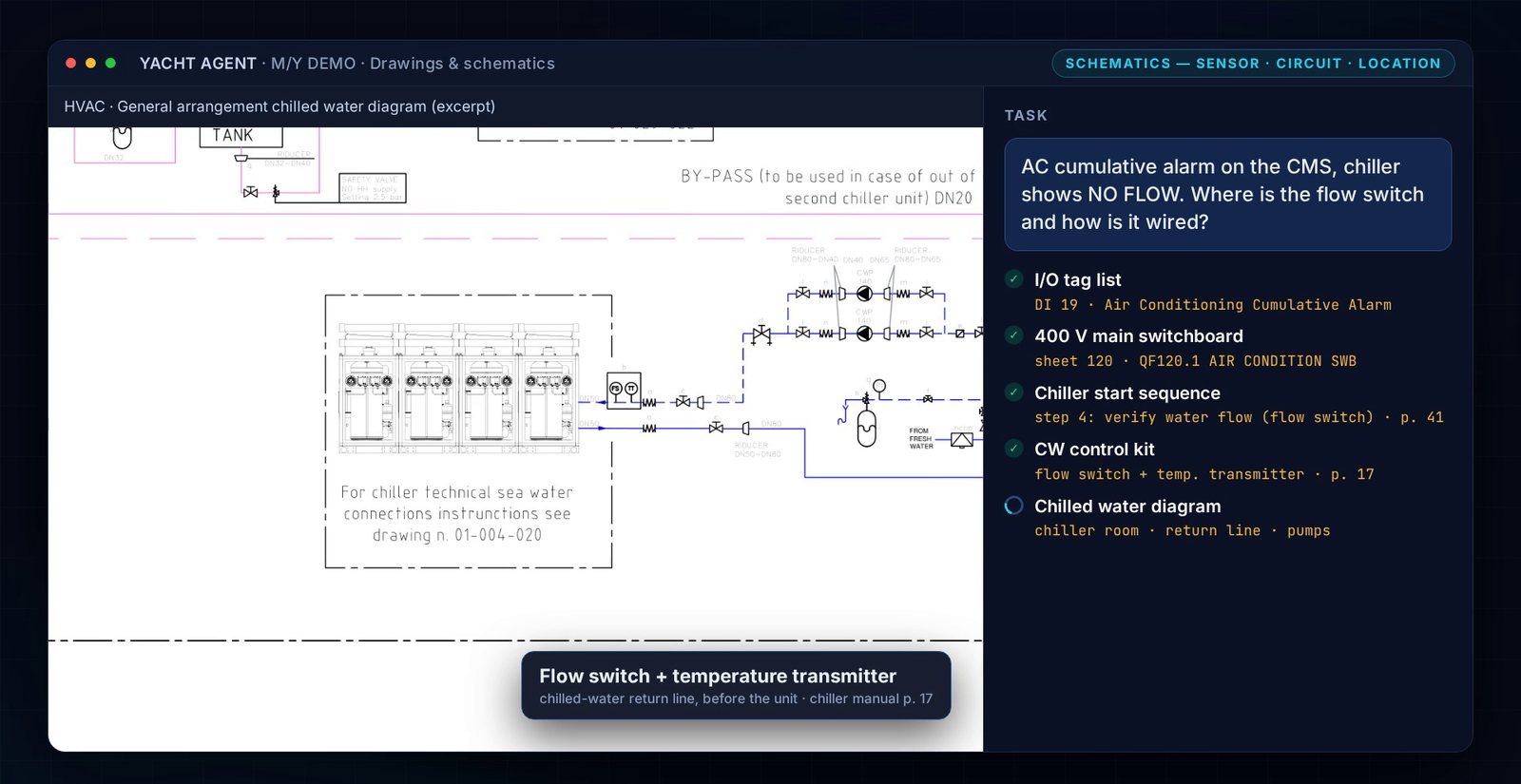
A real case from the demo vessel: the chiller trips on NO FLOW. The agent traces the alarm input, the supply breaker, the start sequence and the sensor's place on the chilled-water line.

Agent interface: the question on the right, the steps with sources, and the chilled-water diagram with the flow switch highlighted
1

You ask

"AC cumulative alarm on the CMS, chiller shows NO FLOW. Where is the flow switch and how is it wired?"

2

The agent works through the documents

I/O tag list → 400 V switchboard → chiller start sequence → control kit → chilled water diagram. Every step shows its page.

DI 19 · QF120.1 · sheet 120 · p. 41 · p. 17
3

The answer, on the drawing

Flow switch and temperature transmitter on the chilled-water return line, before the unit, highlighted on the excerpt. Next steps in order, as a checklist.

For whom

One agent. Each role gets its own work done.

Captain

Class and flag correspondence, survey history, certificates, a status for the owner's office in minutes instead of an afternoon.

"What did class ask for at the last annual, and what is still open?"

Chief Engineer and ETO

Manuals, schematics, troubleshooting, requisitions, maintenance tasks pulled from the manuals into the PMS.

"Oil quantity for the main engines at change, with filters, with the source."

Technical Superintendent

What the contractor actually quoted, what was agreed, what remains open, across several vessels, without reading every thread.

"Summarise the refit correspondence with the yard since March."

Management company

Knowledge survives crew change. One document structure across the fleet, one way of asking, one place to check what was agreed.

"Which vessels have the 10-year survey due in the next 12 months?"

Savings

Money for the company. Time for the crew.

The hours a vessel team loses to finding, reading and re-typing cost the owner twice: in paid time and in what goes wrong while the answer is being looked for. The agent takes that part.

For the management company and the owner's office

  • Fewer contractor call-outs. A fault that is in the manual and on the schematic gets found on board. One call-out with travel typically costs €2,000–5,000.
  • The right part the first time. Part numbers come from the catalogue, quantities from the service scope. No express freight, no second order, typically €500–2,000 per mistake.
  • Less downtime. A fault traced in minutes instead of a day does not cost a charter day, €20,000–80,000 on a vessel this size.
  • No handover losses. At crew change nothing is re-ordered, re-quoted or re-inspected because the history is on the vessel, not in someone's inbox.
  • More vessels per superintendent. The same technical office follows more correspondence and more PMS data with the same people.

For the captain, the engineers and the superintendent

  • Hours back every week. Finding the page, reading the thread and drafting the reply is done before you sit down.
  • Answers in a minute, with the source. Oil quantity, set point, torque, procedure: the page is open, not a search started.
  • Requisitions and RFQs ready for review, not typed line by line.
  • Thread summaries instead of re-reading. What was inspected, what was quoted, what is pending.
  • Handover in the knowledge base. The new engineer asks the vessel, not the previous chief.

How it's set up

We build it around your vessel. Three steps.

You hand over the documents as they are. We return a structured archive, a knowledge base and a connected agent.

SWIPE TO SEE THE WHOLE FLOW →

Manuals · drawings Mail · quotations PMS · reports · logs Shipyard folders Knowledge base system tree · every page indexed with its source Agent finds · reads · drafts answer + page You approve named · logged Reply sent RFQ sent PMS updated your question, in plain language ON BOARD (Local) · ON BOARD + ENCRYPTED LINK (Standard)

Step 1

Documents structured

Shipyard folders, manuals, drawings, PMS exports and mail archives sorted into the vessel's system tree.

  • Duplicates and drafts separated
  • Scans made searchable
  • Index: system, equipment, model, document

Step 2

Knowledge base built

Every page indexed and searchable by meaning, with its source kept. The agent answers from this base, never from memory.

  • Document and page on every answer
  • Vessel history included: mail, reports, logs
  • Updated when new documents arrive

Step 3

Agent connected

Mail, PMS and the archive connected. Local or Standard configuration installed on board. Phone access as an addition.

  • Approval step on every outgoing action
  • Action log
  • Crew briefing: one hour
Typical setupTwo to four weeks from hand-over of the documents to the first answered question, depending on the archive.

Configurations

Local or Standard.

Same agent, same knowledge base. The difference is where the heavy computing runs and what hardware goes on board.

Local

Everything on board. No connection needed.

Fully offline
On-board workstationArchiveMail · PMS
Runs on
A dedicated workstation installed on the vessel
Connectivity
None required. Works at sea and in remote areas
Data
Never leaves the ship
Best for
Strict data policies, long passages, owners who want nothing off board

Standard

Compact unit on board, heavy work over an encrypted link.

Compact hardware
Compact unitArchiveSecure compute
Runs on
A compact unit on board plus secure compute ashore
Connectivity
Encrypted link when online. Archive and search stay available on board
Data
Archive on board. Processing encrypted, region agreed in the contract
Best for
Most vessels, fleets and management companies

You can start with Standard and move to Local later. The knowledge base moves with you.

Data privacy

Confidential by design.

A yacht's archive holds the owner's affairs, contracts and crew correspondence. The agent is built to keep it that way.

Where the data lives

Local: everything stays on the on-board unit, no connection needed. Standard: the archive stays on board; what goes to the secure compute is encrypted in transit and at rest, in a processing region agreed in the contract.

No training, no sharing

Your documents are never used to train models and never shared with third parties. Owner, vessel and crew names can be masked in the knowledge base. Deleted on request, with confirmation.

Who can ask what

Access by role: the captain, the engineers and the management office see what they are entitled to. Every question and every approved action is logged with name and time.

Approval before action

Emails, requisitions and PMS changes wait for a named person to approve. The agent drafts; people send.

GDPR and crew data

Correspondence contains personal data of crew and contractors. Processing is covered by a data processing agreement; retention and deletion follow the vessel's own policy.

NDA before anything

The demo on your documents and every installation start with a signed NDA. Source files are returned or destroyed at the end of the engagement, as you choose.

Demo

Four minutes, five workflows, on a real vessel's documents.

Email, documents, manuals and parts, troubleshooting with schematics, a requisition. Watch the agent work, step by step.

0:43Email1:11Documents and PMS1:29Manuals and parts1:58Troubleshooting2:17Electrical schematics2:47Requisitions

Sound on. Full HD version available on request.

Book a demo

See it on your vessel's documents.

Thirty minutes. Send a few of your own manuals or drawings and we show the agent working on them, under NDA. Captains, chief engineers, superintendents, management companies.

Or write directly:[email protected]We reply within one working day.

No newsletter. We use your details only to arrange the demo.